Find and preview an accessory
- 01
Open the styling panel
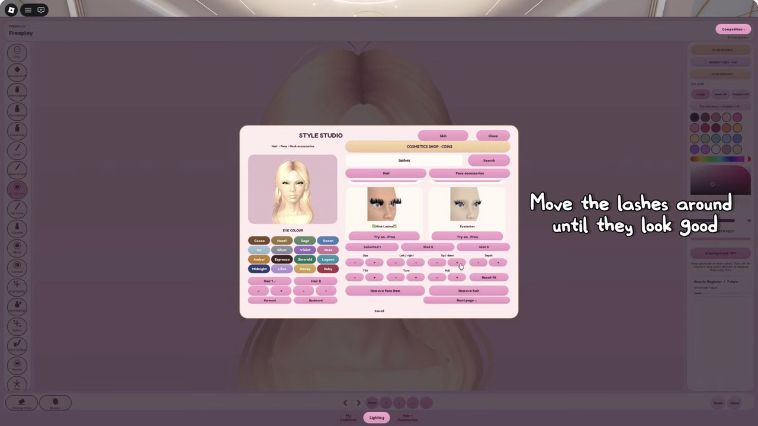
In the referenced build, Hair / Accessories opens Style Studio. Match the current label rather than relying on an old screen position.
- 02
Search the right category
For lashes, use the face-accessory category and search lashes. For hair, switch to the hair category before looking for a style.
- 03
Try one item
Use Try on item beneath its card in the recording. Inspect what changed before choosing another item.
- 04
Adjust in small increments
Use the position controls shown below. Move one control at a time, then inspect both eyes. If the result is worse, reverse that change before trying another.
No lashes, wrong placement or hidden makeup?
| Problem | Next check |
|---|---|
| No search results | Check the selected category, then try the short term lashes. If the panel is still empty, reopen it and check whether other items load. |
| Lashes float above or cut into the eyes | Start from one visible item and adjust incrementally. Avoid changing several controls before checking the result. |
| One eye seems different | Inspect from the front before adjusting. A rotated view or hair covering one side can make the fit look uneven. |
| A new hair choice hides the eye design | Try a more open fringe or remove the competing detail. Compare at ordinary viewing distance. |
| An item has a price | Read the action label. Try-on, in-game use and a Roblox catalog purchase are different actions. |
Fix a look that feels crowded
| Problem | Suggested adjustment |
|---|---|
| Lashes hide the eye makeup | Try a lighter shape or simplify the eyeshadow. |
| Hair covers the defining detail | Choose a style that frames that side of the face. |
| The look has too many focal points | Keep either eyes or lips as the strongest contrast. |
Preview and ownership are different
A styling preview is not evidence that you own the Roblox catalog item. Use the current item label to distinguish trying on, equipping inside the experience and a purchase.
Sources & editorial notes
Sources reviewed October 6, 2026. Interface references are based on linked creator footage, not a new gameplay test by BloxAtlas. Styling suggestions are not claims about vote weighting.