
Reported codes to try
sorrysmalldelay200 Trait Crystals
Bossrush1,500 Gems · 50 Stat Rerolls · 20 Trait Crystals
Update310 Equipment Rerolls · 10 Stat Rerolls · 50 Trait Crystals
Status checked against published lists on October 5; not account-tested. Bossrush and Update3 appear on BloxInformer and Destructoid. The newer sorrysmalldelay report is from Destructoid.
How to redeem
- 01
Return to the lobby
Finish or leave your current run. Use the main lobby rather than looking for the code field inside a battle.
- 02
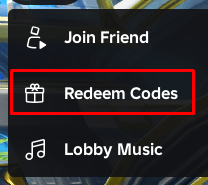
Open the three-dot menu
Look in the top-left corner next to the settings control. Select Redeem Codes in its dropdown.
- 03
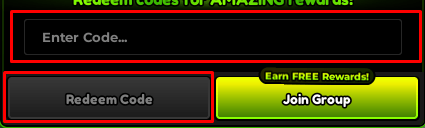
Paste one code and submit
Use the Copy button above, paste into Enter Code, then press Redeem Code. Remove any space before or after the code.
- 04
Check the result
Read the response before entering another code. Compare the reward currency with the list above; already redeemed means that account cannot claim it again.
Code not working? Match the message
| What you see | What to do next |
|---|---|
| Already redeemed | Stop retrying on this account. Check your currency or inventory; a previously claimed code is not a new reward. |
| Invalid / not recognized | Copy again and remove spaces. If the same text still fails, check the older-code list below; this message alone does not prove the code is active. |
| Expired | Move to another code. Rejoining does not renew an expired reward. |
| Level requirement | Read the level shown in the game message. Some older codes had account-level restrictions; do not apply one level threshold to every code. |
| No response / connection error | Let the request finish. If the lobby is unresponsive, reconnect and try once; record the result before repeating. |
Disputed and older codes
| Code group | Current source status |
|---|---|
| Hellfire / RDC26 | Disputed: Pocket Tactics (Oct 2) retains them; Destructoid (Oct 5) lists them as expired. |
| restartsorry! / fastrestart! / Eclipse / 250klikes / 8thCompany / SummerSiege / LighthingGod | Older reports conflict: retained by Pocket Tactics but expired in the newer Destructoid list. |
| RELEASE / EA / EA+ / EvolutionsFix / Update2 | Listed as expired by Destructoid. |
Start with the three recent reports above. The archive is a record of published statuses, not a promise that an older code will redeem.
Use the rewards with a plan
Decide which existing unit needs an improvement before opening a reroll screen. Keep a budget, check the current odds and avoid spending every reroll simply because a code provided more.
Sources & review notes
Public sources reviewed October 5, 2026. Screenshots illustrate the menu, not proof that any particular code still works.